
BuildWise Designer / Free design tools
Free 3D barndominium designer
Design your barndominium online, explore the layout in 3D and see how supported options affect a ballpark estimate. Start without an account, then save or share the idea when you are ready.
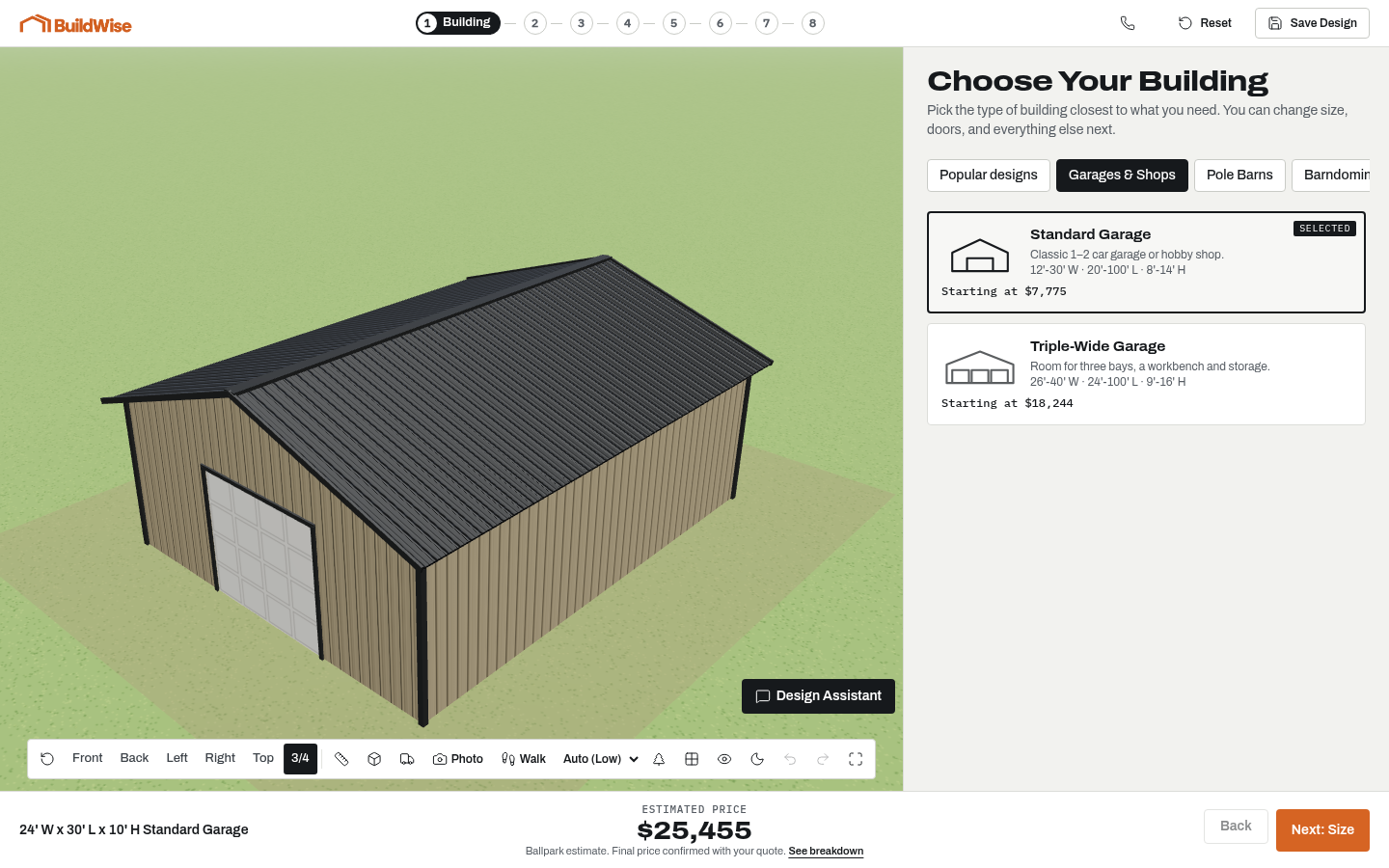
What you can design in the barndominium planner
Start with the building footprint, eave height and roof style. Add lean-tos or porches, choose wall coverage and arrange supported door and window sizes. Exterior colors, wainscot and upgrades help complete the picture. Starter designs give you a baseline if a blank configuration feels too abstract, and you can edit the selections afterward.
The designer is a planning tool, not a complete construction package. It does not produce engineered drawings, material takeoffs or a cut list. For a barndominium, it represents the shell and exterior; your builder finalizes the residential rooms and services. A clear visual design helps communicate what you want without claiming the details needed for a permit have been resolved.
Four steps from an idea to a design
1. Choose a building type or starter design. Select the closest match to how you intend to use the building, not only the example that looks best. A carport, enclosed garage and agricultural barn have different requirements for weather protection and access.
2. Set dimensions and the roof. Work from your actual equipment and site constraints. Then explore extensions and wall coverage. Do the large-scale planning before comparing small color changes, because the footprint affects almost every other choice.
3. Add doors, windows, colors and upgrades. Look at the design from more than one side. A door can look balanced from outside while making the internal work area awkward. The walkthrough and scale props can help you spot that before sending the design.
4. Review, save or share. Check the options list as well as the 3D view. The live estimate is a ballpark based on the selected configuration and sample demo pricing. Submit a quote request when you want a builder to review the design and discuss a real project.
Popular barndominium sizes and possible uses
A dimension describes floor area, not guaranteed capacity. The same footprint can function very differently depending on door placement, aisle width, a storage partition or a loft. Treat these sizes as useful starting points, then measure what you need to put inside.
- 30x40: a compact shell concept; define what belongs in the shop and what will need a separate interior plan.
- 40x50: a starting footprint for comparing shell proportions and garage access.
- 40x60: a common concept for exploring a shop and living-shell combination.
- 50x80: a larger shell where porch lengths, vehicle bays and future use deserve careful planning.
Plan doors around actual access
List the widest and tallest things that must pass through each opening. A truck's mirrors, a boat trailer's overall width and an RV's rooftop accessories can change the clearance you need. Check manufacturer measurements and measure the actual vehicle when practical. A nominal door size is not permission to assume an item will fit comfortably.
Consider the approach as well as the opening. A long trailer needs turning and backing space outside. Inside, leave room to walk around equipment, open doors and reach a workbench. Roof height, overhead door hardware and the structure can affect usable space. Your builder confirms these details before construction; the mockup is a way to begin the conversation.
Use scale props to check the arrangement
Place supported cars, trucks, RVs, boats, tractors or workbenches as approximate scale references. View them with the walls and openings, and use the interior walkthrough to understand the space. Props make it easier to notice that a vehicle blocks a bench or leaves too little room to move around it.
The catalog props are not exact models of your equipment. A fit indicator checks the dimensions represented in the tool, not every accessory or maneuver needed in real life. Compare the prop with your actual measurements and ask the builder to review critical clearances. Saving an arrangement keeps the usage context attached to the building idea.
Lean-tos, lofts and daylight
Lean-tos can provide covered space outside the main footprint for storage or work. Think about wind-driven rain, access to the main doors and the ground surface under the covered area. A loft can help organize storage over part of the building, but headroom, access and intended loads require professional review. Added floor area in a mockup is not a structural design.
Windows can bring daylight to work areas, but their placement should support the layout inside. Avoid treating every exterior wall as equally convenient when a bench, stored equipment or future partition may occupy it. Explore the view from inside and outside, then discuss insulation, ventilation and local requirements with your builder.
What the estimate and quote request mean
Changing an option updates the displayed ballpark total. It is useful for comparing the configured choices in the demo, not for assuming the same building will cost that amount in every county. Site preparation, delivery access, foundations, local loads, permits and current materials can change the final scope and price.
When you send a design, the builder receives your contact information and the selected dimensions and options. That gives the team a practical starting point for follow-up. Expect questions about location, use, timing and site readiness. The final quote comes from the builder after review, not from the appearance of the 3D model.
Frequently asked questions
Is this barndominium designer free?
Yes. The public demo is free to explore. You can try building types, dimensions and options without purchasing software or requesting a quote first.
Do I need to sign up?
No account is required to start designing. Saving a named design or requesting a quote may ask for contact details so the design can be associated with your inquiry.
How accurate is the displayed price?
It is a ballpark estimate based on the configured options. The public demo uses example rates. A local builder confirms the final price after reviewing site conditions, materials, requirements and scope.
Can I plan a pole barn house or barndominium?
You can explore a barndominium shell and exterior, including shop bays and porches. The tool does not finalize bedrooms, bathrooms, utilities or the residential floor plan.
Does it work on my phone?
Yes. The designer supports phone, tablet and desktop layouts. A larger screen can be useful for close inspection, but you can start and edit a design on a phone.
Can I save and share my design?
Yes. Saved and shareable designs let you return to your selections or discuss them with another person. Review the options before submitting a quote request.
What building size do I need for an RV?
Measure your actual RV, including roof accessories, and allow practical clearance around it. Check door dimensions, interior height and the approach outside. Scale props help explore the arrangement but do not replace actual measurements.
Do I need a permit?
Ask your county or local building authority. Requirements depend on location, building use and scope. Your builder can discuss the construction documentation needed for your project.
A building you can see