
BuildWise Designer / Company
Everything your customers need to design and price a building
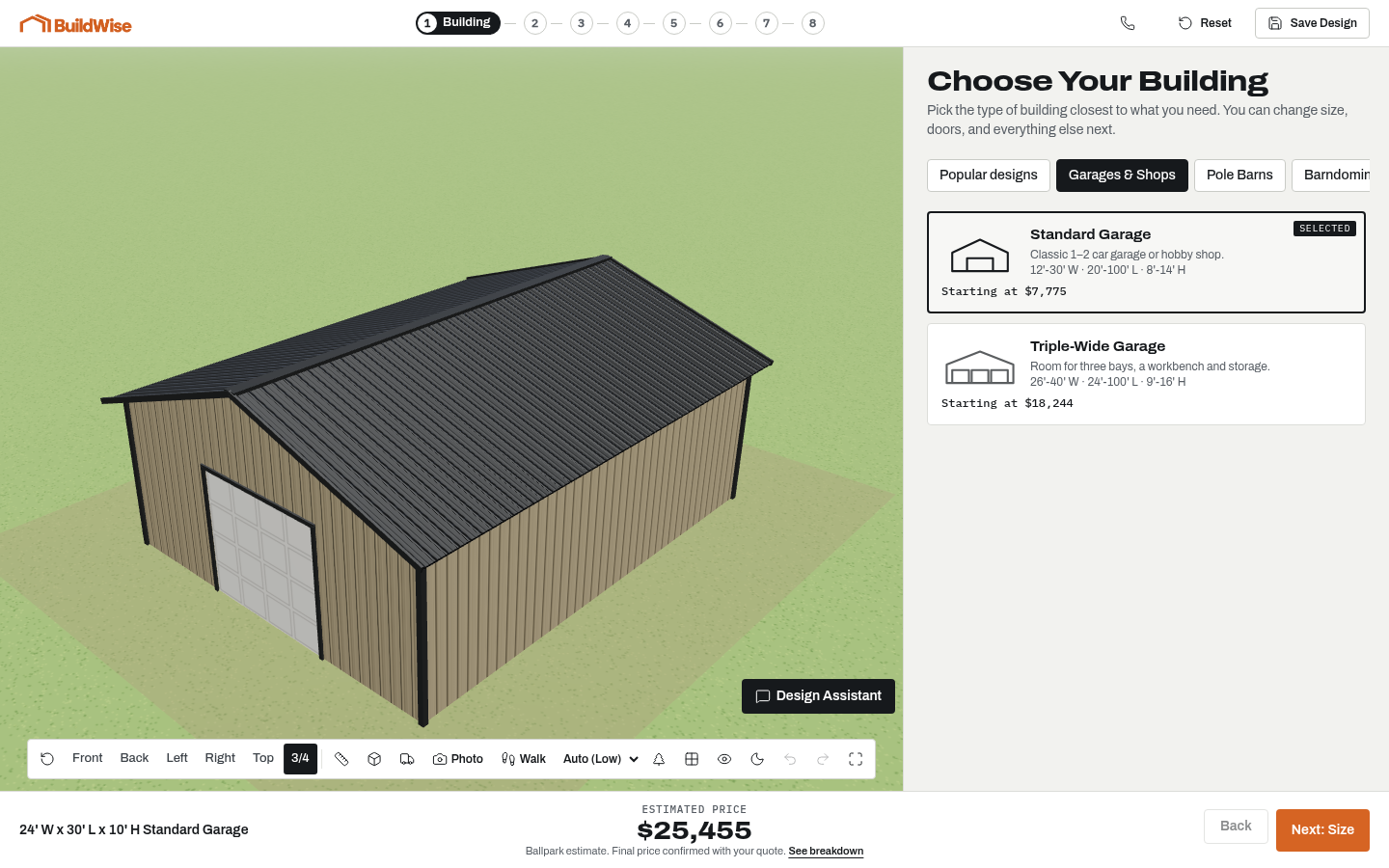
From the first building idea to a detailed quote request, BuildWise Designer brings supported options into one customer-facing experience.
AI design assistant
Customers can describe the building they have in mind rather than begin with every option. The assistant converts a request into supported configuration changes. Buyers inspect the result and continue editing it through the regular controls. It is helpful for a first draft of a shop, barn or barndominium shell, not a source of engineered plans or guaranteed construction advice.
It follows the available building catalog, opening sizes and placement rules. A request that needs adjustment can be explained rather than treated as a valid drawing. Keep the customer in the loop: the strongest use is to make an idea visible and then review it together.
Explore pole barn design softwarePhoto-realistic preview
A generated photo preview places the configured exterior into a more realistic setting. It helps a customer imagine the proportions, colors and roof choice beyond the plain 3D view. These images are generated concepts, not photographs of completed buildings, and should be presented that way.
Use the preview to discuss appearance, not to promise exact site conditions, landscaping or materials. The configuration and quote review remain the source of the building selections. A convincing image is most useful when it supports an accurate scope rather than substitutes for one.
Explore pole barn design softwareInterior walkthrough
The walkthrough lets a buyer view the building from inside. Door placement and the relationship between bays become easier to understand at eye level than from an exterior camera alone. A garage buyer can see how the space feels, and a shop buyer can discuss the intended work area.
It does not create a residential interior plan or establish usable clearance around all real-world hardware. Treat it as a communication tool. Your team still confirms structural dimensions, overhead equipment, access and the final interior scope.
Explore pole barn design softwareScale props
Supported vehicles, equipment and workbenches provide approximate references for a layout. A truck near a door or a tractor inside a bay can reveal a question the buyer did not notice when looking at empty floor area. Props appear with the configuration rather than being a separate mood board.
Customers must measure actual equipment, including mirrors and accessories. The prop catalog gives known approximate dimensions, not every model on the market. Use it to start the fit discussion, then confirm critical measurements before quoting or building.
Explore pole barn design softwareBays and lofts
Open bays, roof-only coverage and loft options help represent more than a simple enclosed box. Agricultural storage may need a covered open end, while a shop may benefit from a loft over part of its footprint. Customers can compare these ideas in the same design.
The tool keeps bay positions tied to the configured post layout. Changes that conflict with openings are surfaced for review rather than silently removed. The builder remains responsible for intended loads, access and structural details.
Explore pole barn design softwareLive ballpark pricing
One estimate changes with the selected dimensions and options. That gives the buyer a visible way to compare a bigger footprint, another door or a covered extension. It also helps your team understand which choices are driving the conversation.
Price settings need to match your business. The public demo uses sample rates, and a displayed total is not a final construction quote. Keep site conditions, permitting and local requirements in your quote process.
Explore pole barn design softwareStarter designs
Templates give customers a recognizable starting point. A builder who frequently sells a particular garage or barn layout can present that concept before asking buyers to configure every detail. Customers can edit the selections rather than treating the template as a fixed package.
Administrators can create, hide and reorder starter designs and maintain their thumbnails. Review template pricing and configuration as your catalog changes. A useful gallery represents what you sell, not a collection of unrelated inspiration images.
Explore pole barn design softwareQuote-ready leads
Quote requests bring contact information together with the building configuration. Dimensions, openings, colors and selected upgrades give your salesperson something concrete to review. Bays, lofts and props add context about the intended use.
A detailed inquiry is not automatically a qualified buyer. Continue asking about service area, site readiness, timing and budget. BuildWise organizes the design conversation; it is not a CRM, contract-signing service or payment platform.
Explore pole barn design softwareBuilder administration
The admin area provides access to supported price settings, templates, props, feature switches and analytics. These controls keep the customer experience aligned with the builder catalog and allow optional tools to be hidden when they are not needed.
Administration is limited to approved accounts. The customer-facing demo does not expose editing privileges. Review changes with representative designs before using them in production, especially when altering material rates or common starter configurations.
Explore pole barn design softwarePhone, tablet and desktop
Buyers do not always start planning at a desk. Phone and tablet layouts let them explore while discussing the project with family or looking at the intended site. The controls and 3D view adapt to the available space.
Test the designer inside your actual website, not only in a separate browser tab. Host-page spacing, iframe height and navigation affect usability. Keep a direct link to the full designer available when an embedded view is too cramped.
Explore pole barn design softwareOn your website
A dedicated designer page can connect your project examples with a clear next step. An iframe keeps the interactive tool separate from the host website, while a direct link can be used when embedding is not appropriate. Static marketing pages do not need to load the 3D scene.
Nova Online Marketing can discuss an optional done-for-you website alongside the designer. Confirm the scope, branding, service area and catalog before launch. Good integration should make the customer journey clearer, not imply that software replaces your sales team.
Explore pole barn design softwareFrequently asked questions
Can optional features be disabled?
Yes. Administrators can hide supported optional tools. Existing saved designs still retain their selections and price even when a control is hidden.
Does this replace estimating or engineering software?
No. BuildWise provides customer-facing design and ballpark pricing. It does not produce stamped drawings, material takeoffs or cut lists.
A building you can see