
BuildWise Designer / Software for builders
Barndominium design software for barndo builders
Help buyers plan the barndominium shell, shop bays and exterior before your team finalizes the construction scope and interior floor plan.
Turn saved inspiration into a defined shell
Barndo buyers often arrive with several ideas collected over months: a porch from one project, an RV door from another and a roof color from a third. Those pictures do not necessarily describe one practical building. A customer-facing barndominium designer lets them combine the exterior choices into a configuration your team can discuss.
BuildWise designs the building shell and exterior, not a complete residential floor plan. Bedrooms, bathrooms, kitchens, mechanical systems and permitted occupancy are finalized with the builder and appropriate professionals. Keeping that distinction visible prevents a convincing exterior image from being mistaken for finished house plans.
From an idea to a usable scope
A barndominium inquiry often begins with a dimension and little else. One customer says “a place for the truck,” another sends a sketch with a door drawn against a corner, and a third wants a price before deciding whether to add a lean-to. The salesperson still has to discover what belongs in the quote. A designer does not eliminate that conversation, but it gives the customer a better way to prepare for it.
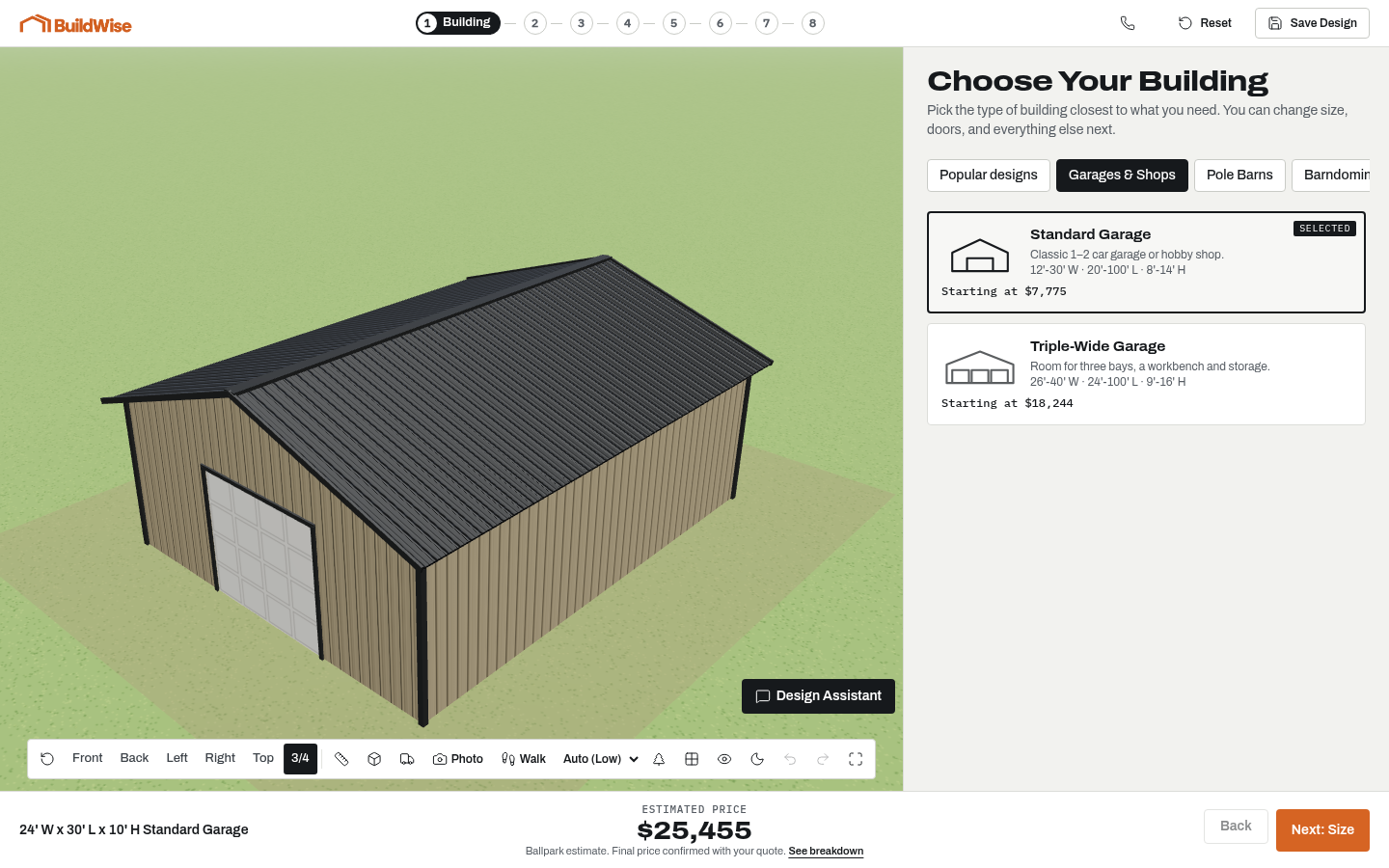
BuildWise connects the shape of the building to the selections behind it. Instead of trying to interpret an isolated photograph, buyers can change the width, length, roof pitch and door arrangement themselves. A saved design becomes a reference both sides can discuss. The point is not to turn a customer into a construction professional. It is to make their intent visible before your team invests time in a final estimate.
A three-step customer journey
First, the customer chooses a starter design or begins with a building type. Templates are useful when you repeatedly quote similar barndominium projects. They give a buyer a recognizable starting point without forcing them to know every option in advance. Your team can manage, hide and reorder starter designs as your catalog changes.
Second, the buyer works through dimensions, extensions, walls, openings, colors and upgrades. Changes appear in the 3D view and in the ballpark estimate. The progression keeps the major decisions in a sensible order, while completed steps remain available for editing. A customer can compare an enclosed bay with an open one without losing the rest of the design.
Third, the customer reviews the design and sends a quote request. The request includes contact information and the configuration, so your first follow-up can address actual choices. You can ask whether a door needs to clear a loaded trailer or whether an added porch is intended for daily use, rather than restarting with “what size building did you want?”
A live estimate without a false promise
Your rates should reflect the products you sell. A national example price is not a substitute for your local labor, materials and installation assumptions. BuildWise uses builder-configured price settings to calculate one ballpark total as the design changes. That estimate gives the customer a way to understand tradeoffs; it is not a signed offer or a guaranteed installed price.
Explain the boundary clearly on your website and during follow-up. Site access, grading, foundations, permitting, design loads and material availability can affect a quote. The designer does not produce stamped drawings, a cut list or material takeoffs. Keep your internal estimating and engineering process. Use the customer's design as a front-end scope document, not as approval to start construction.
Your catalog, your starting designs
Administrators manage templates, available optional features and supported price settings. A reference ZIP can be used when evaluating starter designs, while the working designer prices the selected configuration. Your published catalog should describe only the buildings and options your company actually offers. Demo defaults must be reviewed before a customer treats the tool as your sales experience.
This matters especially for specialty doors, insulation packages and regional structural requirements. A configurable option does not establish that it is offered in every service area. Check the catalog against your sales process, test a representative set of common designs, and make the quote-review step part of normal operations. Your team remains responsible for confirming buildability and scope.
Use it on your website and on phones
Place the designer where a buyer already expects to plan a barndominium: a dedicated design page, a building-type page or a clear call to action beside your project examples. An iframe can keep the designer and host website separate; a direct link is an alternative when the page cannot provide enough space. Neither approach requires your marketing pages to load an interactive 3D scene.
Customers can explore on a phone, tablet or desktop. Smaller screens need room for the building view and touch-friendly options, not a tiny desktop widget. Preview your embed in the actual host page, check that its buttons remain reachable, and keep a plain link to the full designer available. Good integration is about a usable customer journey, not only matching the logo.
A detailed lead is a better starting conversation
A quote request carries the dimensions, roof selection, wall configuration, doors, windows, colors, extensions and selected upgrades with the customer's contact details. Bays, lofts and scale props help explain how the space is intended to work. That combination is more useful than an email containing a square-foot figure with no opening arrangement or usage context.
Do not confuse detail with purchase intent. Some people will still be researching, and a complete design does not guarantee a sale. Your follow-up can identify timing, site readiness, service area and budget. BuildWise helps organize the inquiry; it is not a CRM, payment service or contract-signing system. Continue using the tools and judgment your business already relies on.
Shop and living ambitions need different conversations
A 40x60 shell with a porch and RV door is a useful starting request for the AI design assistant. It can arrange supported dimensions, extensions, colors and openings through the same configuration rules used by manual design. Customers then inspect and edit the result rather than accepting an unverified drawing. The assistant does not establish the layout of the living area.
The shop portion benefits from the walkthrough and scale props. Check how a boat trailer, truck or RV sits relative to a door, and think about space for movement around it. Porch proportions and roof-only bays can be explored outside. The final estimate still depends on the actual residential finish, utilities and site requirements; an exterior-shell total is not a turnkey-home price.
Frequently asked questions
Can I use my own building prices?
Yes. Builder-editable price settings drive the estimate. Configure your rates and offered options before sending customers to a production designer. The public demo uses sample rates, not a promise about your local construction costs.
Do customers need an account?
Customers can explore the designer without signing up. Contact information is requested when they want to save a named design or submit a quote request, not before they can begin planning.
Does it work on my existing website?
The designer can be presented on a dedicated page using an iframe, or opened through a direct link. The host website must allow the embed and give it enough space, particularly on phones. Test the integration before launch.
Is the displayed price a final quote?
No. It is a ballpark estimate for the configured building. Your team confirms site conditions, delivery, permits, structural requirements and current material costs in the final quote.
How fast is setup?
Setup depends on how ready your catalog, option rules, branding and price information are. Send those details for a scope discussion. We do not promise a launch date before reviewing your requirements.
Can I turn optional features off?
Administrators can control optional features such as starter designs, bays and lofts, scale props, the design assistant, photo preview and walkthrough. Disabling a feature does not erase saved designs that already use it.
Does it create the interior house floor plan?
No. The tool focuses on the shell, exterior, shop spaces and supported building options. Your builder finalizes rooms, services, structural design and the residential floor plan.
A building you can see